Head-to-Head: Tcl Qm8K vs Anker Nebula X1 (Detailed Comparison)
The home entertainment landscape has shifted dramatically over the last few years, moving away from a singular focus on traditional television sets toward a more diverse ecosystem of display technologies. For many consumers, the choice is no longer just between different brands of LED panels, but between entirely different categories of hardware: the high-performance Mini-LED television and the high-end smart projector. In this comparison, we look at two heavy hitters representing these distinct philosophies: the TCL QM8K (the 2024 refinement of their flagship Mini-LED line) and the Anker Nebula X1 (a premium long-throw smart projector designed for cinematic immersion).
Choosing between these two devices requires more than just looking at a spec sheet; it requires an understanding of how you use your living space. The TCL QM8K is built for the user who demands searing brightness and tack-sharp 4K clarity regardless of the time of day. Conversely, the Anker Nebula X1 is designed for those who prioritize the sheer scale of the image and the unique "filmic" quality that only a projection system can provide. This article dives deep into the performance, usability, and long-term value of both units to help you decide which deserves a permanent spot in your home theater.
The Evolution of TCL’s Mini-LED: A Deep Dive into the QM8K
TCL has spent the better part of the last decade transforming from a value-oriented brand into a legitimate competitor for the high-end crown. The QM8K represents the pinnacle of that journey. Utilizing a sophisticated Mini-LED backlight system with thousands of local dimming zones, this television is designed to challenge OLED’s dominance in contrast while offering brightness levels that OLED simply cannot match. The "K" in the model name signifies the latest iteration of their flagship series, bringing improved processing and more refined light control.
The primary appeal of the QM8K lies in its peak brightness. In high dynamic range (HDR) scenes, this panel can reach levels that make highlights—like a setting sun or a muzzle flash in an action movie—feel physically impactful. This isn't just about raw power; it's about the ability to maintain detail in those bright areas. When watching 4K Blu-rays, the QM8K reveals textures in clouds and reflections that often get washed out on lesser displays. The local dimming algorithm has also seen a significant upgrade, effectively minimizing "blooming"—that distracting halo of light that can appear around bright objects on dark backgrounds.
For gamers, the QM8K is a powerhouse. It supports a 144Hz refresh rate and features dedicated gaming ports that handle VRR (Variable Refresh Rate) and ALLM (Auto Low Latency Mode). Coupled with the punchy colors provided by its Quantum Dot layer, games like Elden Ring or Call of Duty look vibrant and feel incredibly responsive. The built-in Google TV interface is snappy, providing easy access to all major streaming platforms with integrated voice search that actually works reliably.
Pros and Cons: TCL QM8K
- Pro: Incredible peak brightness, making it the best choice for bright living rooms with lots of windows.
- Pro: Deep black levels and excellent contrast for a non-OLED panel, thanks to thousands of dimming zones.
- Pro: High refresh rate (144Hz) and low input lag make it a top-tier choice for competitive gaming.
- Pro: Integrated Google TV platform is intuitive and stocks nearly every available streaming app.
- Con: Viewing angles are somewhat narrow; colors and contrast begin to shift if you are sitting far to the side.
- Con: The screen is highly reflective, which can be distracting if there are direct light sources behind the viewer.
- Con: While slim for its tech, it remains a heavy, substantial unit that requires a sturdy wall mount or large stand.
Cinematic Scale: Analyzing the Anker Nebula X1 Projector
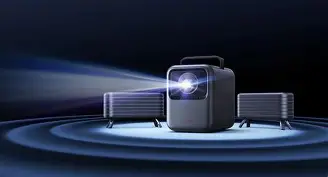
The Anker Nebula X1 takes a completely different approach. Rather than being confined to a glass panel, the X1 uses an advanced laser light source to throw a massive image onto your wall or a dedicated screen. It is part of a new generation of projectors that prioritize "smart" features and ease of use, aiming to replace the traditional TV rather than just being a secondary device for movie nights.
While the TCL wins on brightness, the Nebula X1 wins on immersion. You can easily scale the image from 60 inches up to 150 inches. There is a psychological difference when a character on screen is life-sized; it changes the way you engage with storytelling. The X1 uses ALPD (Advanced Laser Phosphor Display) technology, which provides a wide color gamut and helps the projector produce images that feel natural and "theatrical" rather than "electronic."
One of the biggest hurdles for projectors has historically been the setup process. Anker has addressed this with the Nebula X1 by including comprehensive AI-driven auto-focus, auto-keystone, and even screen fit technology. You can place the projector on a coffee table, and within seconds, it squares the image and focuses it perfectly. It even features obstacle avoidance, shrinking the image slightly if it detects a light switch or a piece of wall art in the way. Sound is another surprising win here; while most TVs have thin, downward-firing speakers, the X1 includes a robust built-in sound system designed to fill a room, often negating the immediate need for a soundbar in smaller setups.
Pros and Cons: Anker Nebula X1
- Pro: Ability to create a massive 150-inch screen, providing a true theater experience at home.
- Pro: Highly portable compared to a 75-inch TV; it can be moved between rooms or even taken to a friend's house.
- Pro: Advanced laser light source offers a long lifespan (up to 25,000 hours) with consistent color.
- Pro: Excellent "Smart" setup features like auto-keystone and obstacle avoidance make it beginner-friendly.
- Con: Brightness cannot compete with a premium TV; requires a dark or light-controlled room for the best results.
- Con: Lower native contrast compared to Mini-LED; blacks will often look more like deep greys in a non-treated room.
- Con: Projector fan noise, while quiet, is still present and can be heard during silent movie scenes if you are sitting nearby.
Technical Comparison: TCL QM8K vs. Anker Nebula X1
Comparing a television and a projector requires looking at different sets of metrics. While resolution might be the same (4K), the way that light reaches your eyes is fundamentally different. The following table highlights the core technical differences between these two flagship-style devices.
Discover deals on TVs & Home Theater — updated daily.
Browse Now →| Feature | TCL QM8K (Mini-LED TV) | Anker Nebula X1 (Laser Projector) |
|---|---|---|
| Display Tech | VA Panel with Mini-LED Backlight | DLP with Laser Light Source (ALPD) |
| Max Image Size | Fixed (available up to 98") | Variable (typically 60" to 150") |
| Peak Brightness | Up to 5,000 nits (model dependent) | Approx. 2,200 ANSI Lumens |
| HDR Support | Dolby Vision IQ, HDR10+, HLG | HDR10, HLG |
| Refresh Rate | 120Hz / 144Hz with VRR | 60Hz (typical) |
| Operating System | Google TV | Android TV / Nebula UI |
| Contrast Ratio | Infinite (Effective via Local Dimming) | Native approx. 1000:1 to 2000:1 |
| Best Environment | Direct sunlight / Any lighting | Dedicated dark room / Nighttime |
Performance Analysis: Real-World Use Cases
To truly understand which device is right for you, we have to look at how they perform in common household scenarios. A spec sheet doesn't tell the full story of what happens when you’re trying to watch a football game on a Sunday afternoon or playing a fast-paced shooter in the evening.
The Living Room Battle: Daytime Viewing
In a standard living room with windows, the TCL QM8K is the undisputed champion. Ambient light is the enemy of projection. Even with the Nebula X1's high lumen count, sunlight hitting the wall will wash out the image, making dark scenes in movies almost unwatchable. The QM8K, however, has enough raw power to cut through reflections. If your primary viewing time is during the day, or if you prefer to keep the lights on while you watch, the television is the only logical choice. The Mini-LED technology ensures that the image remains vibrant and saturated regardless of environmental light.
The Cinema Experience: Immersive Movies
This is where the Anker Nebula X1 shines. There is a sense of "prestige" to a projected image that a television cannot replicate. Because the light is reflected off a surface toward your eyes (rather than being beamed directly from a backlight), it is often perceived as being easier on the eyes during long viewing sessions. When you turn the lights off, the X1 transforms your room. The sheer scale of a 120-inch or 150-inch image makes epic films like Dune or Lord of the Rings feel significantly more impactful. The Nebula X1’s color accuracy is surprisingly good out of the box, offering a warm, cinematic profile that feels less clinical than the ultra-sharp TCL.
The Gamer’s Perspective
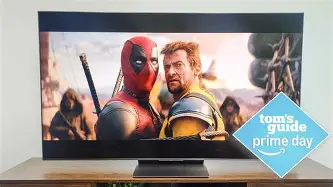
Gaming involves two main factors: visual quality and latency. The TCL QM8K is built for the modern console generation (PS5 and Xbox Series X). With its HDMI 2.1 ports and support for 4K at 120Hz (and even 144Hz for PC gamers), it offers a fluid experience that projectors struggle to match. While the Nebula X1 has a "Game Mode" that reduces input lag, it is still inherently limited by its 60Hz refresh rate and the processing overhead of DLP technology. For casual gaming—think Mario Kart or Animal Crossing—the scale of the projector is a blast. For competitive gaming or high-fidelity titles, the TCL's response time and high-refresh capabilities provide a clear advantage.
Buying Guide: Choosing Your Display Path
Before making a final decision, consider the physical and lifestyle constraints of your home. Both the TCL QM8K and the Anker Nebula X1 represent significant investments, and their "fit" in your life depends on these four factors:
1. Room Control
Can you black out your room? If you have thick blackout curtains and you mostly watch content at night, the Anker Nebula X1 offers a unique "event" feeling every time you turn it on. If your room is open-plan or has many windows without curtains, save yourself the frustration and go with the TCL QM8K. A projector in a bright room is like a high-performance sports car on an unpaved road; you'll never see what it's truly capable of.
2. Installation Flexibility
The TCL QM8K is a permanent fixture. Once it’s on the wall or a stand, it stays there. It requires careful cable management and a dedicated space. The Anker Nebula X1 offers more flexibility. Because it is relatively compact and has excellent auto-calibration features, you can set it up in the living room for a movie, move it to the bedroom for a late-night show, or even use it in the backyard for a summer screening. If you move frequently or like to change your room layout, the projector is much more accommodating.
3. Content Type
What do you actually watch? If your media diet consists of 4K HDR streaming, sports, and news, the TCL’s clarity and brightness will serve those formats best. If you are a cinephile with a library of films, or if you want to recreate the "theater" feeling for your family, the Nebula X1 is designed for that specific purpose. The projector is about the "scale" of the story, whereas the TV is about the "detail" of the pixels.
Shop the latest TVs & Home Theater picks on Amazon.
View Offers →4. Maintenance and Longevity
Traditional projectors were plagued by expensive bulb replacements. The Nebula X1 uses a laser source that lasts for tens of thousands of hours—essentially the lifetime of the device. However, projectors are more susceptible to dust and require clear air paths for cooling fans. The TCL QM8K is a "set it and forget it" device. Aside from the occasional software update, it requires zero maintenance. For families with small children or pets who might bump into a projector setup, the wall-mounted TV is often the safer, more durable bet.
Sound Quality and Integration
Often overlooked in the TV vs. Projector debate is the audio experience. Most flagship TVs, including the QM8K, attempt to include "subwoofers" and multi-driver arrays in their thin chassis. While the TCL sounds decent for casual viewing, its thin profile limits its physical ability to move air. You will likely want a soundbar or a full surround system to match the 41-inch to 98-inch visuals.
The Anker Nebula X1, being a larger box, actually has room for more substantial speaker drivers. Anker leverages its "Soundcore" heritage here, giving the X1 a surprisingly deep and wide soundstage. It supports various Dolby audio formats and can even be used as a standalone Bluetooth speaker. Ironically, while the projector provides the more "pro" visual experience, its built-in audio is often more "all-in-one" than the TV, making it a simpler setup for those who don't want to deal with external speakers.
Final Verdict
The TCL QM8K and the Anker Nebula X1 are both leaders in their respective classes, but they serve different masters. The TCL QM8K is the ultimate "utility" display. It is the best of the best for someone who wants one screen to do everything—gaming, daytime TV, and high-quality movies—without ever worrying about lighting conditions. It is a technological marvel that pushes the limits of what an LED panel can achieve, offering a level of brightness that is truly industry-leading.
The Anker Nebula X1 is for the dreamer. It is for the person who wants to sit in the dark and be transported. It sacrifices the convenience of daytime viewing and the ultra-low latency of a gaming monitor for something more atmospheric. The scale of the image provided by the X1 creates a social experience that a TV, no matter how large, cannot quite replicate. It turns a "show" into an "event."
Ultimately, the TCL QM8K wins on technical specs and versatility, making it the safer recommendation for the vast majority of buyers. However, if you have the right room and the desire for a theater-at-home lifestyle, the Anker Nebula X1 offers a "wow factor" that the TCL cannot match. Your choice should be dictated by your environment first and your content second. Either way, you are looking at the cutting edge of modern home entertainment.